Waypoint360 Sync
Retrieve your DJI flight logs and photos — automatically, from your PC.
Version 0.5.0 — released on October 15, 2026
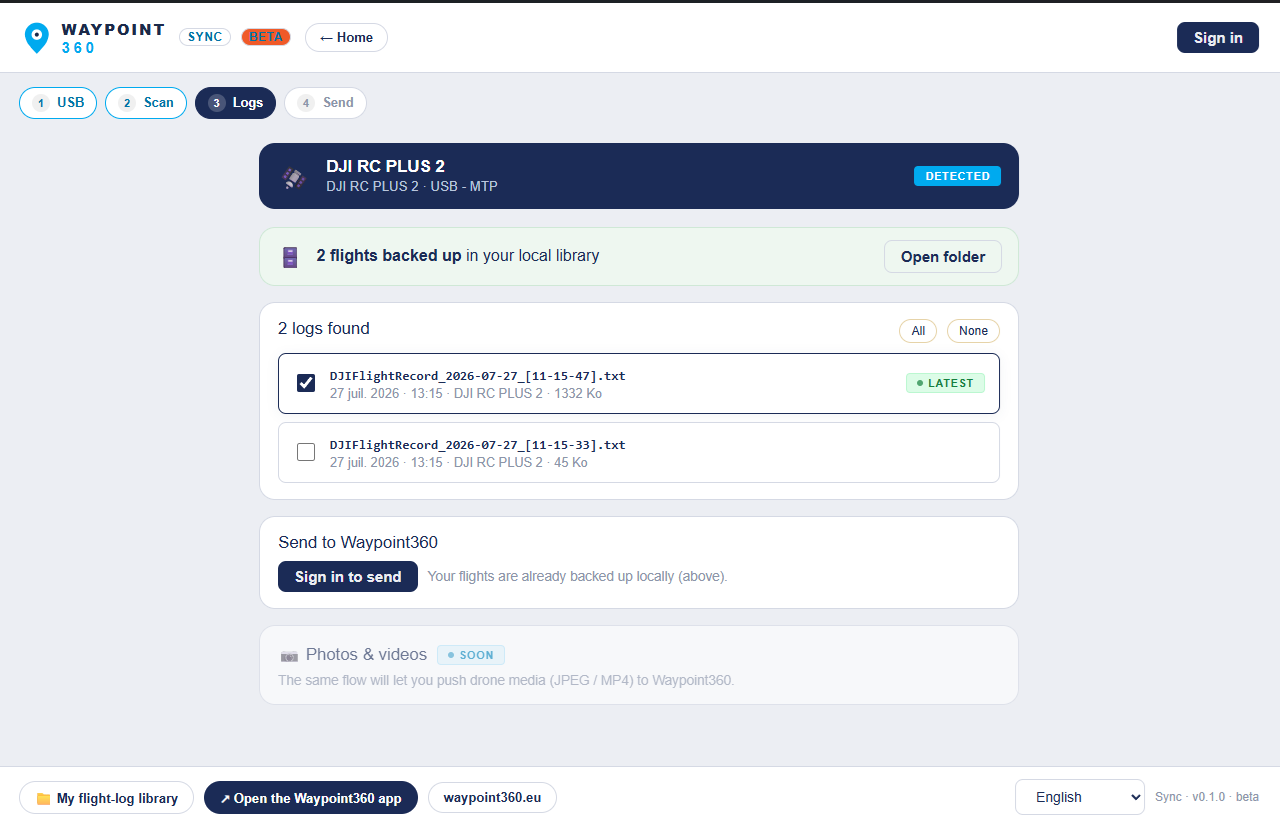
The Waypoint360 Sync app in action — USB detection, local backup, sending flights and media.
What Sync does
Detects your device
Plug in your controller, goggles or phone: Sync detects the DJI device and finds your flight logs.
Backs up locally
Every flight is copied to your local library, per device. You never lose a log again, even if DJI deletes it.
Photos and videos
Sync also finds your media on the drone and its SD card. Thumbnails go to the platform; the original goes straight to your own storage.
Sends to Waypoint360
In one click, send your decoded flights (map, stats) to your Waypoint360 account, attached to the right job.
Installation
- Download the installer, then double-click it.
- Windows shows a warning (unsigned beta): “More info” → “Run anyway”.
- Launch Sync, sign in to your Waypoint360 account, plug in your device.
The “unknown publisher” warning is normal in beta (the app will be signed in version 1). The app is read-only on your device and runs no downloaded code.
Your data
Sync reads your logs and copies them to your PC; the upload to Waypoint360 goes over HTTPS, under your account. For photos and videos, only thumbnails reach us: the original goes straight from your machine to the storage you chose, never through our servers. No data is shared without your action, and the app needs no administrator rights.
Ready to retrieve your flights?